Filtering Links in descending order
📘 Information below might be outdated - please visit our recently updated API Reference
The instruction below shows how to filter short links.
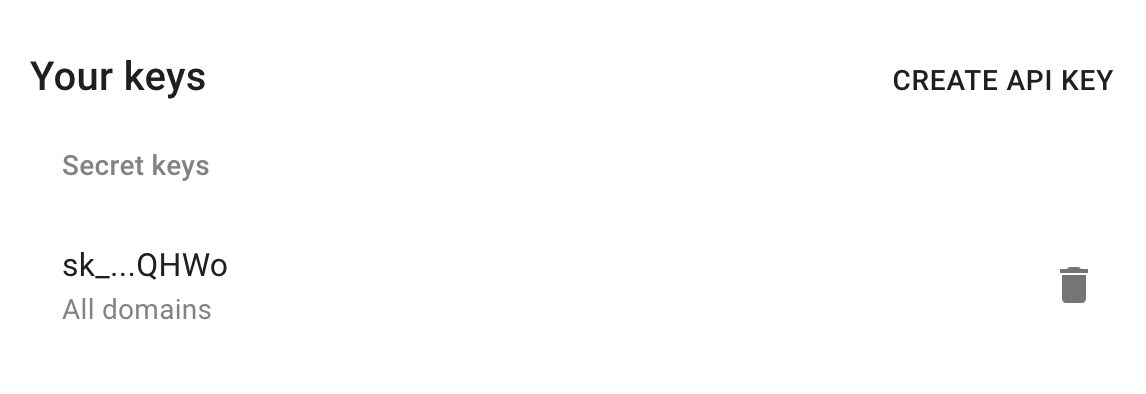
1) Get your API key here: https://app.short.io/settings/integrations/api-key
- Click "Create API key".
- Add a Secret key.
2) Copy an ID of a domain you want to filter links.
- Open domain settings.
- Copy the domain ID.


3) Install prerequisites for requests.
- Python
- Node.js
pip install requests
// No additional dependencies required (uses native fetch)
Now everything is ready to run the following snippet. It will return the most popular short links.
4) Create a file: filename.py/ .js/ .rb. Use the code snippet below.
📘
Please, replace domainID and Period with appropriate values.
👍
Available periods: today, yesterday, total, week, month, lastmonth, last7, last30 and custom.
- Python
- Node.js
- Ruby
import requests

url = "https://api-v2.short.io/statistics/domain/domainID/paths"

querystring = {"period":"total","tzOffset":"0"}

headers = {
    'accept': "*/*",
    'authorization': "<<apiKey>>"
    }

response = requests.request("GET", url, headers=headers, params=querystring)

print(response.text)
const url = "https://api-v2.short.io/statistics/domain/domainID/paths?period=total&tzOffset=0";
const options = {
  method: "GET",
  headers: {
    accept: "*/*",
    authorization: "<<apiKey>>"
  }
};

const response = await fetch(url, options);
const data = await response.json();
console.log(data);
require 'uri'
require 'net/http'
require 'openssl'

url = URI("https://api-v2.short.io/statistics/domain/domainID/paths?period=total&tzOffset=0")

http = Net::HTTP.new(url.host, url.port)
http.use_ssl = true
http.verify_mode = OpenSSL::SSL::VERIFY_NONE

request = Net::HTTP::Get.new(url)
request["accept"] = '*/*'
request["authorization"] = '<<apiKey>>'

response = http.request(request)
puts response.read_body
5) Launch the file.
- Python
- Node.js
- Ruby
python filename.py
node filename.js
ruby filename.rb
6) JSON Response.
Once you run the code, you will see the response.
[
  { score: '2277', path: '/', displayName: '/' },
  { score: '698', path: '/smart', displayName: '/smart' },
  { score: '517', path: '/wordpress', displayName: '/wordpress' },
  { score: '485', path: '/login', displayName: '/login' },
  { score: '309', path: '/wp-login.php', displayName: '/wp-login.php' },
  { score: '275', path: '/twilio', displayName: '/twilio' },
  { score: '247', path: '/notion', displayName: '/notion' },
  {
    score: '108',
    path: '/support/troubleshooting',
    displayName: '/support/troubleshooting'
  },
  { score: '103', path: '/cn', displayName: '/cn' },
  {
  { score: '103', path: '/wiki', displayName: '/wiki' },
  {
    score: '98',
    path: '/landing-cloaking-reg',
    displayName: '/landing-cloaking-reg'
  },
  { score: '62', path: '/GoogleChrome', displayName: '/GoogleChrome' },
  {
    score: '49',
    path: '/landing-cloaking-feature-click-analytics',
    displayName: '/landing-cloaking-feature-click-analytics'
  },
  {
    score: '34',
    path: '/google-chrome',
    displayName: '/google-chrome'
  }
]
7) How to request filtering for a custom period
🚧
startDate and endDate parameters require date format in milliseconds from epoch.
Here you can convert your date: https://www.epochconverter.com/
pip install arrow
- Python
- Node.js
- Ruby
import requests
import arrow

url = "https://api-v2.short.cm/statistics/domain/domainID/paths"

querystring = {"period":"custom","tzOffset":"0", "startDate": arrow.get('2020-05-01T21:23:58.970460+07:00').timestamp * 1000,"endDate": arrow.get('2020-05-04T21:23:58.970460+07:00').timestamp * 1000}

headers = {
    'accept': "*/*",
    'authorization': "<<apiKey>>"
    }

response = requests.request("GET", url, headers=headers, params=querystring)

print(response.text)
const startDate = new Date("2020-05-01T15:56:53").valueOf();
const endDate = new Date("2020-05-03T15:56:53").valueOf();
const url = `https://api-v2.short.cm/statistics/domain/domainID/paths?period=custom&tzOffset=0&startDate=${startDate}&endDate=${endDate}`;
const options = {
  method: "GET",
  headers: {
    accept: "*/*",
    authorization: "<<apiKey>>"
  }
};

const response = await fetch(url, options);
const data = await response.json();
console.log(data);
require 'uri'
require 'net/http'
require 'openssl'

url = URI("https://api-v2.short.cm/statistics/domain/domainID/paths?period=custom&tzOffset=0&startDate=1588231150000&endDate=1588663150000")

http = Net::HTTP.new(url.host, url.port)
http.use_ssl = true
http.verify_mode = OpenSSL::SSL::VERIFY_NONE

request = Net::HTTP::Get.new(url)
request["accept"] = '*/*'
request["authorization"] = '<<apiKey>>'

response = http.request(request)
puts response.read_body
[
  { score: '19', path: '/notion', displayName: '/notion' },
  { score: '8', path: '/login', displayName: '/login' },
  { score: '7', path: '/', displayName: '/' },
  { score: '5', path: '/wordpress', displayName: '/wordpress' },
  { score: '2', path: '/blog-about', displayName: '/blog-about' },
  { score: '1', path: '/godaddy-sup', displayName: '/godaddy-sup' },
  { score: '1', path: '/apii', displayName: '/apii' },
  {
    score: '1',
    path: '/zapier-integration',
    displayName: '/zapier-integration'
  },
  { score: '1', path: '/integrations', displayName: '/integrations' }
]